Showing posts with label Download Softwares. Show all posts

Windows 7 nVIDIA Edition 2010 (x86/x64)

Default Windows 7 nVIDIA Edition 2010 (x86/x64)

 A Edition 2

Windows 7 nVIDIA Edition 2010 (x86/x64)

This image has been resized. Click this bar to view the full image. The original image is sized 1303x768.


Quote:
Note:The pictures and system files which were created for Windows 7 NVIDIA Edition 2010 do not belong to any other

persons.

No Viruses, Malware or Back Doors. Tested with Kaspersky, NOD32.
Platform: Windows
Compilation Date: 18.11.2009
Version: Based on Windows 7 Ultimate (Both x86 and x64)
Category : Operating System
Activation: 30 days trial
CD-Key : Needed
Size: 4.091 GB
Number of Rar parts: 0 -- Full ISO and extras folder contained in Original UP(s) by elpuertorro
No of DVD's: 1
Image Format: ISO Image File
Installation Time : 15 Mins

WINDOWS ACTIVATION:

For Activation, Purchase a Genuine key directly from Microsoft. (See Extra Folder)

Note : THIS IS NOT A PIRATED WINDOWS 7 OPERATING SYSTEM. (i.e NO PATCHES OR CRACKS OR KEYS INCLUDED IN THE DVD)

Minimum System Requirements:
1.) 1GB RAM (Recommended 2GB RAM for 64-Bit)
2.) 20 GB of HDD space (It's a BIG one folks! put it on at LEAST a 40GB drive or partition if you want any working room)
3.) 128 MB Graphics Memory (Capable to run Aero)
4.) 17 inch Monitor (1024 x 768)
5.) DVD-ROM or DVD-RAM
6.) Pixel Shader 2.0
8.) Active Internet Connection (For Activation and Updates)
This image has been resized. Click this bar to view the full image. The original image is sized 1400x875.


This image has been resized. Click this bar to view the full image. The original image is sized 1400x875.


Quote:
*** Multi - Core Processors with 64 Bit OS Capable***

Note: Start a fresh installation from the BIOS and install it in a separate partition. **Format the selected drive for


installation before proceeding with the other steps**. Don't try to install Windows 7 NVIDIA in Non-supportive Motherboards.


Features,overview and updates of Windows Seven® NVIDIA Edition 2010:


* New Windows Sounds

* New High quality icons
* NVIDIA Tweaker from Rockers Team
* Improved Texture quality for NVIDIA cards
* Cleaner picture quality than normal view
* Reduced Gaming crashes
* Disabled Apply Colors At Startup
* Consumes low power
* All the latest updates are patched Manually.
* Resolved a Windows 7 Media Center issue for systems configured for ISDB broadcasts.
* Supports all future updates and packages
* Resolved some reliability issues in Windows 7
* Resolved compatibility issues
* Adobe Flash Player plug-in
* Black and blue Background Shells
* Codings and scripts are updated for Gaming level (This option is available only in Rockers Team Customized Windows and not


available in any other customized OS)

* More Stable and Reliable
* UAC Disabled
* Large Icons Control panel
* New Look for Windows Media Player
* New Shortcut Arrows
* Show extensions for known file types
* Enabled IE Phishing Filter
* User *** 2 on Control Panel
* Low Memory consumption
* Enabled Glass Effect without a supported card
* Windows will tell you exactly what it is doing when it is shutting down or is booting
* Added command prompt to right click context menu
* Enabled additional Avalon effects
* Disabled Tool Tips
* Enabled ClearType Tuning
* Added 'Copy to Folder' , 'Move to Folder' and 'Open with Notepad' to right click context
* Disabled Windows Media Player AutoUpdates
* Menu bars and window frames opaque
* Enabled slow-motion window effects
* Added "Advanced System Properties" in my Computer
* Added Control Panel to my Computer
* Faster browsing with IE
* DEP execution is set to Default
* Disabled the NTFS Last Access Time Stamp
* Disabled kernel paging
* Both 32 and 64 Bit Integrated
* All the Latest Drivers Integrated
* 7-zip for extraction purposes.
* Adobe Flash Player plugin
* Adobe Flash Player ActiveX
* Orbit Downloader
* Java Runtime Environment Update 17
* ImgBurn
* Added Group policy and Registry editor to control panel
* Updated DirectX to August 2009
* Mozilla Firefox 3.5
* Turned off system beeps
* Stopped caching negative responses
* Take Ownership, Device manager, Group policy, Registry Editor in the right click
* Fully Automated setup you need to choose language and prepared partition only.
* Patched uxtheme files to use 3rd party themes.
* Faster Shutdown (3 seconds services kill timeout.)
* Fast Booting Time
* Added User ***s 2 on ControlPanel.
* Power Off after shutdown
* New High quality Icons
* Changed command line text color to white
* Set mouse pointer speed to maximum
* Removed the annoying clicking sound
* Disabled automatic restart in the event of a blue screen
* Tweaked up shell response
* Hibernation is Disabled.
* Added "Advanced System Properties" in my Computer
* Added Control Panel to my Computer
* Added Administrative Tools to my Computer
* Added Internet Explorer to my Computer
* Added Network Connections to my Computer
* Added Search to my Computer
* Added Printers to my Computer
* Added Run and Windows Flip Switcher to my Computer
* Removed warning about showing hidden system folders
* Shutdown when you click power Button on start Menu
* Maximum simultaneous downloads for IE to 20 ( default is 2 )
* New look for Windows Media Center
* New Explorer View
* Allow renaming and removing of Recycle Bin
* Makes a right click option for unknown files
* Notepad saves window position
* Opens 16-bit apps in a separate memory space. This increases stability when dealing with 16-bit apps.
* Enabled Word wrap in Notepad
* Enabled Status Bar in all windows
* NVIDIA Drivers Added
* New Themes
* 255 Sidebar Gadgets
* Enabled search system folders in Search
* System Files are boosted up to maximum Performance
* Removed Old Default Graphics card drivers
* Faster Application load Time
* Improved the performance and reliability
* Disabled the NTFS Last Access Time Stamp
* Disabled kernel paging
* Windows Update service disabled
* Turned off system beeps
* Stopped caching negative responses
* Take Ownership, Device manager, Group policy, Registry Editor in the right click
* Specifies the time, following user input, during which the system keeps apps from moving into the foreground.
* No components removed
Installation-Instructions:
Quote:
1.) Burn the .iso image at slowest speed possible

2.) Save this on external drive or flashdrive as you will need it after the install.


3.) Install Win 7 NVidia Edition..


4.) Apply Key or any other method of activation you want


5.)Enjoy!

**elpuertorro notes**

Quote:
1.) Scanned by me with Avira and IObit Security 360 100% clean

2.) You can use a legit key or check the included Extra pack I added.


3.) Yes you can install on a ATI system just DON'T use the NVidia tweaker.


5.) For help with this OS or questions please go to:rtwincustomize.net

Default Windows 7 nVIDIA Edition 2010 (x86/x64)


Windows 7 Loader eXtreme Edition 3.503

Windows 7 Loader eXtreme Edition 3.503

Windows 7 Loader eXtreme Edition 3.503


Windows 7 Loader eXtreme Edition 3.503 | 27 MB

Windows 7 Loader Extreme Edition - is a versatile tool to activate any version of Windows 7/ Vista/ 2008R2/ 2008. Interacts directly with elements of the operating system responsible for activation.

Links:-

Code:
http://www.filesonic.com/file/158314421/W7.Loader.eXtreme.Edition.3.50_Rapid4all.org.rar
or
http://rapidshare.com/files/451014270/W7.Loader.eXtreme.Edition.3.50_Rapid4all.org.rar


Windows 7 Loader eXtreme Edition 3.503


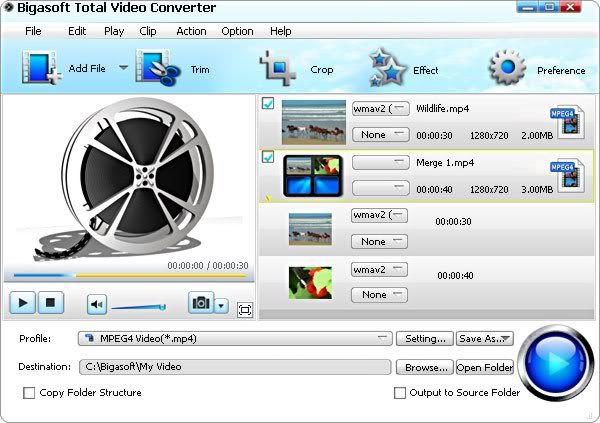
Bigasoft Total Video Converter v3.1.17.4079 Multilanguage-LAXiTY


Bigasoft Total Video Converter v3.1.17.4079 Multilanguage-LAXiTY

 Bigasoft Total Video Converter v3.1.17.4079 Multilanguage-LAXiTY
BBigasoft Total Video Converter v3.1.17.4079 Multilanguage-LAXiTY | 10 Mb


Bigasoft Total Video Converter helps you fast convert between various video files to enjoy your favorite movie or music video on portable device, mobile phone, mp4 player, personal computer, television, YouTube and so on with ease. The powerful video conversion tool supports video conversion between a wide range of video formats, including AVI, Xvid, DivX, H.264, MP4, 3GP, MKV, WMV, RM, FLV, MOV, WebM, VP8 etc.

Key Features

1. Convert video format
* Easily convert between any video format such as MP4, 3GP, AVI, Xvid, DivX, H.264, MKV, WMV, RM, FLV, MOV, MOD, TOD, M2TS, and more. It can be used as AVI converter, MP4 converter, 3GP converter and so on.
2. Digital playback devices support
* Convert all kinds of videos to mobile videos which can be watched on various digital playback devices like cell phone, PDA, PSP, iPod, iPhone, BlackBerry, Xbox, Xbox360, PS3, Archos, Creative Zen, iRiver, television, Apple TV, personal computer and so on.
3. Convert audio files
* Convert between audio files like MP3, WMA, AAC, WAV, OGG, FLAC, APE, M4A, RA, AC3, MP2, AIFF, AMR and so on.
4. Extract audio from video
* Rip music from your favorite movie or music video to listen whenever you like.
5. Support WebM/VP8 decode
* It can serve as a WebM/VP8 decoder and converter which can convert WebM/VP8 to many other videos such as MP4, MOV, AVI, 3GP, FLV, H.264, MKV, WMV, RM, Xvid, DivX, etc., and can extract music from WebM/VP8 and save as OGG, MP3, AAC, AC3, WAV, WMA, etc.
6. WebM/VP8 encode
* Total Video Converter fully supports WebM/VP8 encode which can create WebM file and VP8 video (the HTML5 supported video format) for uploading to YouTube and any HTML5 websites. It can convert to WebM/VP8 from various videos including convert WebM/VP8 to MP4, MOV, AVI, 3GP, FLV, H.264, MKV, WMV, RM, Xvid, DivX, etc.
7. Capture picture from video
* Take video snapshot to capture a certain scene in the video as you like.
8. Movie effect support
* Adjust output video effects like cut video into small pieces, remove black edge of movie.
9. Preview before conversion
10. Extremely fast conversion speed
11. Batch conversion
* Convert multiple files at a time to save your time. Moreover, it can turn into a great video joiner to merge them into a complete one.
12. Easy to use
* By super easy and intuitive user interface, only 3 steps, and you can easily enjoy favorite movie wherever you are.
13. Multi-language support
* Provides chooses including English, German, French, Spanish, Japanese, Arabic, Italian and Chinese now.
14. Compatible with Windows 7
* Support all Windows including Windows 7, Windows XP, Windows Vista, and Windows 2000.

Home:

http://www.bigasoft.com/total-video-converter.html


Download:
http://www.filesonic.com/file/190244711/Bigasoft.Total.Video.Converter.v3.1.17.4079.Multilanguage-LAXiTY.rar

Bigasoft Total Video Converter v3.1.17.4079 Multilanguage-LAXiTY


Diskeeper 2011 Pro Premier 15.0.951.0 Multilingual


Diskeeper 2011 Pro Premier 15.0.951.0 Multilingual

 Diskeeper 2011 Pro Premier 15.0.951.0 Multilingual

Diskeeper 2011 Pro Premier 15.0.951.0 Multilingual | 43 MB

Diskeeper® 2011 Pro Premier performance software includes powerful fragmentation prevention technology that can enormously boost workstations with heavy performance demands to levels of speed and efficiency far beyond previous limits. For pre-existing fragmentation and for the small percentage of fragmentation that is not prevented, Pro Premier takes on large hard drives and volume sizes effortlessly with powerful defrag engines designed specifically for big defrag jobs. Diskeeper 2011 Pro Premier will extend the life and increase the efficiency of your systems while greatly increasing workplace productivity.

* New! IntelliWrite™ fragmentation prevention technology. IntelliWrite prevents up to 85% of the fragmentation every system suffers from. It intelligently writes contiguous files to the disk so system resources are not wasted creating fragmentation. The results? A whole new level of system speed and efficiency.
IntelliWrite
* InvisiTasking® technology —Available in Diskeeper® 2010 performance software, InvisiTasking provides up-to-the-moment defragmentation without tapping into active system resources. The result: completely invisible yet robust automatic defragmentation that acts in real time to keep your computer running at maximum performance.
* Real-time defragmentation —Handle fragmentation as it occurs, providing maximum speed and performance at all times!
* Uncompromising file and free space defragmentation —Defragment in the most extreme hard drive environments. Diskeeper 2011 eliminates fragmentation even on disks with as little as 1% free space or files split in millions of fragments.
* "Defragmentation Intelligence" enhancements —Diskeeper monitors and analyzes each drive, then chooses a defragmentation strategy specific to the needs of that drive. Every drive is defragmented using the best method possible.
* I-FAAST® 2.0 (Intelligent File Access Acceleration Sequencing Technology) automatically boosts access speeds for the most commonly used files.
* Volume Shadow Copy Service (VSS) Compatibility mode —Diskeeper works intimately with the automatic backup system already on your PC. VSS compatibility mode means, Diskeeper does not damage your ability to recover lost files and does not take up valuable free space with unnecessary file information.
* Native 64 bit operating systems support.
* Boot-Time Mode safely performs Microsoft® recommended defragmentation of critical system files.
* Network Management Support —control Diskeeper settings and functionality via Diskeeper Administrator edition or Group Policy.

Diskeeper® 2011 performance software is essential software for every Windows system. Without it, maximum system speed and efficiency would be unattainable and fragmentation related slows, crashes and freezes would be unavoidable.

Home Page - http://www.diskeeper.com/

Download
http://www.filesonic.com/file/190374351

Diskeeper 2011 Pro Premier 15.0.951.0 Multilingual


Cisco Speed Meter Pro 1.3.9052


Cisco Speed Meter Pro 1.3.9052

 Cisco Speed Meter Pro 1.3.9052
Cisco Speed Meter Pro 1.3.9052 | 21 Mb


With Speed Meter Pro, take the guesswork out of trying to figure out what is causing slowdowns. This powerful software utility helps you diagnose and manage your wireless, network and Internet connection so you can optimize your connected experience

Is someone downloading a large file or streaming video? Is your cordless phone interfering with your wireless connection? Or, is an application or neighbor stealing bandwidth?

With Speed Meter Pro, take the guesswork out of trying to figure out what is causing slowdowns. This powerful software utility helps you diagnose and manage your wireless, network and Internet connection so you can optimize your connected experience

* Scans across your entire network including computers, wired and wireless networks and Internet connection
* Identifies the source of network slowdowns, saving you troubleshooting time
* Enables you to address problems quickly and optimize your network for maximum speed and productivity
* Proactively monitors your network to detect issues that need immediate attention

Key Features
View your entire network configuration and performance in one place
o View the device dashboard with traffic flow and program data to see how network resources are being used
o Quickly identify slowdowns and pinpoint issues on your local network, your wireless router or Internet connection that affect performance
o Visually see the devices and software programs that are using your network

Manage the performance for all of your home network connections
o Analyze your wireless connection to make sure you are getting maximum speed with the best throughput
o Track your favorite websites and their performance to see if connection issues are due to your network, the website or a general slowing of the Internet
o View a 30-day history of download and upload speeds, letting you track specific performance trends and causes

Receive Alerts and network status information
o Set alerts to track if a connection status is slow, interrupted or down
o Get real time data on traffic flow and speed between your computer and other devices on your network and between your computer and Internet
o Check traffic volume and connection status of everything connected on your home network

Home:

http://www.purenetworks.com/product/speedmeterpro/


Download:
http://www.filesonic.com/file/190672802/Cisco_Speed_Meter_Pro_1.3.9052.rar

Cisco Speed Meter Pro 1.3.9052


Kuassa Amplifikation One VST 1.2.0


Kuassa Amplifikation One VST 1.2.0

 Kuassa Amplifikation One VST 1.2.0
Kuassa Amplifikation One VST 1.2.0 | 16.43 Mb
Kuassa, Inc. is proud to announce the immediate availability of Kuassa Amplifikation One V 1.0.0. Kuassa Amplifikation One is a guitar software amp suite which finally help you to build great tracks immediately without any obstructive workflow or confusing parameters. Kuassa Amplifikation One is a guitar amplifier in the form of software. This “guitar amp on your PC” captures the dynamics and characteristics of hardware distortion modules, head amplifiers, and cabinets, captured by various types of microphones in multiple configurations. Kuassa Amplifikation One is not an emulation or modeled after specific amplifier, we try to capture the best aspect of schematic designs, tubes, electronics and computer programming to achieve the supreme tone for your guitar through your personal computer while maintaining the user interface as easy as possible. Stop messing around with your gears, get productive!. Users are able to control every aspects of the software just like real amplifiers including (but not limited to) gain structure, tone, mic position, and distance.

Features:

* Straightforward and easy to use user interface.
* 8 head amplifiers, noise gate and 5 distortion modules.
* 5 cabinet models, users are able to use 2 cabs simultaneously.
* 5 microphone types (straight or angled).
* Mic distance and free positioning of mic around the speaker.
* Dedicated input and output volume control.
* Saturation, output limiter and up to high quality 4x maximum oversampling to the amp calculation.

Download Links


http://www.fileserve.com/file/DxWdAYU/kao120-asgn.rar

Kuassa Amplifikation One VST 1.2.0


DivX Plus 8.1.2 Build 1.5.0.33


DivX Plus 8.1.2 Build 1.5.0.33

 DivX Plus 8.1.2 Build 1.5.0.33

DivX Plus 8.1.2 Build 1.5.0.33 | 45.8 MB

The next generation of DivX video! Download DivX Plus™ Software to play DivX®, AVI, MKV, MOV and MP4 video with our media player. Or watch these videos in other popular media players like Windows Media Player or Media Player classic. Purchase DivX Pro to create your own HD DivX videos. DivX® is a digital video format that offers a high-quality viewing experience on any device or platform — from your PC to your phone to your living room TV. Over 100 million devices that support DivX video have shipped worldwide from major manufactures, including DVD players, gaming consoles, mobile phones and more. DivX® gives you the power to watch, create and share high-quality videos on your Windows or Mac computer.

DivX technology enables highly compressed video without compromising visual quality — so you can enjoy a cinematic experience on your computer, in your living room or wherever you go.
H.264 is a new standard that is poised to power the high definition video revolution by offering incredible visual quality, performance and efficiency. DivX 8 gives you all the tools you need to take full advantage of H.264 for a truly cinematic video experience.

• Convert your video, including HD files, to DivX video using DivX Converter, or create video compilations with DVD features using DivX Author
• Post a DivX video to your site using DivX Web Player
• Watch your videos, even HD videos (H.264/AAC) from the Internet, with DivX Player

DivX® technology lets you take your high-quality videos from your computer and play them in full-screen glory on your living room TV. Use one of the millions of DivX Certified® devices, such as a Blu-ray DVD player, gaming console or DivX Connected device, to watch your videos directly on your TV.
• Stream your videos, photos, music and Internet video (e.g. YouTube) to your TV with DivX Connected™
• Burn a video to disc for playback in a DivX Certified DVD player
• Copy a video to a USB drive or a SD card and watch it on a DivX Certified TV

You don't stay in one place and neither should your media. With a DivX Certified® mobile device, you can watch your high-quality DivX® videos, and even record new ones, wherever you go.
• Watch your videos anywhere your phone goes
• Shoot your own video with a DivX Certified digital camera or mobile phone
• Travel in style with video playback on any DivX Certified portable media player or in-car media player

Play
• Plays DivX video (.divx, .avi)
• Plays HD H.264 video (.mkv)
• Supports AAC and MP3 audio
• Includes DFX Audio Enhancer

Create
• One-step conversion to DivX video
• Outputs .divx ,.avi, .mkv files
• Includes DivX Plus™ HD encode profile
• Includes advanced encode settings

DivX® Pro 8 for Windows is our premium software offering, providing everything you need for a true HD experience. Utilizing our latest and greatest video technology based on H.264, the new standard for HD digital video, DivX Pro 7 lets you create HD video and play MKV videos with high-quality AAC audio. You can also play your DivX files (.divx, .avi) on millions of DivX Certified® devices today. Look for DivX Plus™ HD Certified devices later this year that will support playback of all DivX and DivX Plus files, as well as .mkv (H.264/AAC) videos from the Internet.

DivX Plus Codec Pack:
• Play high-quality videos with DivX Codec
• Watch DivX, AVI, MKV and MP4 videos in popular media players
• Stream MKV videos to your game console (using Windows 7)

DivX Plus Converter:
• Convert your videos to DivX or MKV in one step
• Create high definition MKV videos for free
• Backup personal DVDs with the additional MPEG-2/DVD Plug-in

DivX Plus Player:
• Play DivX, AVI, MKV, MP4 and MOV videos
• Transfer videos to your devices with DivX To Go
• Navigate your videos with greater speed and precision

DivX Plus Web Player:
• Watch DivX, AVI and MKV videos in your web browser
• Experience stunning 1080p video with 5.1 channel surround sound
• Enjoy multiple audio tracks and subtitles

DivX 8.0 for Windows includes:
• DivX Plus Player 8.0
• DivX Plus Web Player 2.0
• DivX Plus Converter 8.0
• DivX Plus Codec Pack 1.0

Home Page - http://www.divx.com/en/software/divx-plus

Download
http://www.filesonic.com/file/191200211

DivX Plus 8.1.2 Build 1.5.0.33


Internet Download Manager 6.05 Build 5 Retail


http://www.internetdownloadmanager.com


Download:
http://www.filesonic.com/file/191637491/Internet_Download_Manager_6.05_Build_5_Retail.zip

Internet Download Manager 6.05 Build 5 Retail


Internet Download Manager 6.05 Build 5 Retail

 Internet Download Manager 6.05 Build 5 Retail
Internet Download Manager 6.05 Build 5 Final | 4 Mb


Internet Download Manager has a smart download logic accelerator that features intelligent dynamic file segmentation and safe multipart downloading technology to accelerate your downloads. Unlike other download accelerators and managers that segment files before downloading starts, Internet Download Manager segments downloaded files dynamically during download process. Internet Download Manager reuses available connections without additional connect and login stages to achieve better acceleration performance.

Internet Download Manager supports proxy servers, ftp and http protocols, firewalls, redirects, cookies, authorization, MP3 audio and MPEG video content processing. IDM integrates seamlessly into Microsoft Internet Explorer, Netscape, MSN Explorer, AOL, Opera, Mozilla, Mozilla Firefox, Mozilla Firebird, Avant Browser, MyIE2, and all other popular browsers to automatically handle your downloads. You can also drag and drop files, or use Internet Download Manager from command line. Internet Download Manager can dial your modem at the set time, download the files you want, then hang up or even shut down your computer when it's done.

Main Features:
• All popular browsers and applications are supported! Internet Download Manager has been tested with the following browsers: Internet Explorer, MSN Explorer, AOL, Netscape Communicator, Netscape 6, Netscape 7, Mozilla, Mozilla Firefox, Mozilla Firebird, Opera, NetCaptor, UltraBrowser, Slim Browser, Avant Browser, MyIE2, Optimal Desktop, Ace Explorer, Advanced Browser, 27 Tools-in-1 Wichio Browser, WindowSurfer, 550 Access Browser, FineBrowser Freeware, Kopassa Browser, Fast Browser Pro, Enigma Browser, GoSuRF, K-Meleon, Smart Explorer, The Off By One Web Browser, Smartalec Voyager, CrystalPort AppCapture, The Family Browser, XANA Web Browser, Bluto, AutoSurf, 32bit Web Browser, BrowseMan, WrestlingBrowser, Eminem Browser, UltraBrowser, Cygsoft LDAP Browser, and Net M@nager. Internet Download Manager supports all versions of popular browsers, and can be integrated into any 3rd party Internet applications.
• Easy downloading with one click. When you click on a download link in a browser, IDM will take over the download and accelerate it. IDM supports HTTP, FTP, HTTPS and MMS protocols.
• Download Speed Acceleration. Internet Download Manager can accelerate downloads by up to 5 times due to its intelligent dynamic file segmentation technology. Unlike other download managers and accelerators Internet Download Manager segments downloaded files dynamically during download process and reuses available connections without additional connect and login stages to achieve best acceleration performance.
• Download Resume. Internet Download Manager will resume unfinished download from the place where they left off.
• YouTube grabber. Internet Download Manager can grab FLV videos from popular sites like YouTube, MySpaceTV, and Google Video.
• Simple installation wizard. Quick and easy installation program will make necessary settings for you, and check your connection at the end to ensure trouble free installation of Internet Download Manager
• Drag and Drop. You may simply drag and drop links to IDM, and drag and drop downloaded files out of Internet Download Manager.
• Automatic Antivirus checking. Antivirus checking makes your downloads free from viruses and trojans.
• Advanced Browser Integration. When enabled, the feature can be used to catch any download from any application. None of download managers have this feature.
• Built-in Scheduler. Internet Download Manager can connect to the Internet at a set time, download the files you want, disconnect, or shut down your computer when it's done.
• IDM includes web site spider and grabber. IDM downloads all required files that are specified with filters from web sites, for example all pictures from a web site, or subsets of web sites, or complete web sites for offline browsing. It's possible to schedule multiple grabber projects to run them once at a specified time, stop them at a specified time, or run periodically to synchronize changes.
• IDM supports many types of proxy servers. For example, IDM works with Microsoft ISA, and FTP proxy servers.
• IDM supports main authentication protocols: Basic, Negotiate, NTLM, and Keberos. Thus IDM can access many Internet and proxy servers using login name and password.
• Download All feature. IDM can add all downloads linked to the current page. It's easy to download multiple files with this feature.
• Customizable Interface. You may choose the order, and what buttons and columns appear on the main IDM window.
• Download Categories. Internet Download Manager can be used to organize downloads automatically using defined download categories.
• Quick Update Feature. Quick update may check for new versions of IDM and update IDM once per week.
• Download limits. Progressive downloading with quotas feature. The feature is useful for connections that use some kind of fair access policy (or FAP) like Direcway, Direct PC, Hughes, etc.
• IDM is multilingual. IDM is translated to Albanian, Arabic, Azerbaijan, Bosnian, Bulgarian, Chinese, Croatian, Czech, Danish, Dutch, Farsi, French, German, Greek, Hebrew, Hungarian, Italian, Japanese, Korean, Lithuanian, Macedonian, Norwegian, Polish, Portuguese, Romanian, Russian, Serbian, Slovak, Slovenian, Spanish, Thai, Turkish, and Uzbek languages.

Home:

AceMoney 4.16


AceMoney 4.16

 AceMoney 4.16

AceMoney 4.16 | 6 Mb


AceMoney helps people organize and manage their personal finances quickly and easily. It supports all the features required for home or even small-business accounting needs.

Features:
- Manage multiple accounts of different types
- Create and manage budgets
- Track performance of investments
- Do your financial math in multiple currencies
- Track your spending habits and see where the money goes
- Enjoy the convenience of on-line banking
- Don't miss the next deadline for bills
- Double check
- Plan debts and mortgage payments
- Do e-business with AceMoney


Home:

www.mechcad.net


Download:
http://www.filesonic.com/file/193523781/AceMoney_4.16.rar

AceMoney 4.16


NI LabView 2011 PRO - MacOSX


NI LabView 2011 PRO - MacOSX

 NI LabView 2011 PRO - MacOSX

NI LabView 2011 PRO | MacOSX | 1.56 GB
National Instruments first introduced LabVIEW graphical programming on the Mac in 1986. Twenty years later, NI proudly continues to provide Mac users the latest PC-based technology, including full support for NI LabVIEW, more than 80 measurement devices, and driver software for data acquisition and instrument control, for developing custom measurement and automation systems based on Mac OS X.

Features

Optimized compiler
Your graphics code will run faster by optimizing compiler in LabVIEW 2010.

User changes
Thanks to feedback from users of the community LabVIEW Idea Exchange in LabVIEW 2010 were added changes to make the programming much easier and more convenient.

Streaming Network
Use the new features in Network Streams for streaming data between distributed network controllers, and host-machines.

Save the compiled code separately from the original VI
Thanks to configure the properties of VI developers of large projects will be able to save the compiled code separately from the source code, they are working on at any given time.

SubVI Inlining
With the new property VI, you can reduce the time of your applications, eliminating delays associated with calling SubVI.
Export data to Excel directly from the charts

In 2010 LabVIEW, you can save on the graph derived data in Excel files with just a few mouse clicks.
Configure the equipment through the web-browser
You can view the properties and configure the equipment connected to your PC using NI Network Browser and ordinary web-browser.

Importing external IP for FPGA
With host IP Integration Node, you can integrate third-party functions for FPGA, VHDL code or files. Xco, created in Xilinx Core Generator, in their projects LabVIEW FPGA.

Find and install drivers for devices
With the new version of NI Instrument Driver Finder you can quickly find and download drivers for the devices connected to your system and download ready-made examples and projects for the devices.

Packaging Library Project
Thanks to a new file type. Lvlibp you can save the entire library of project files, and files relating thereto and VI, in a single file.

LabView 2011 PRO for mac

LabVIEW for mac 2011 is labeled LabVIEW 2010 SP1, This is their 2011 Release for MAC. It Has many bug fixes from 2010 Pro!

Includes:

NI Daq-MX drivers
cdSim
VI analyser
Internet tool kit and
Lego Mind-storm module.

Includes unlimited site license.

Install notes:

I have included a key. During my test it was not needed but just incase you may need it.

The installer claims to "crash" at the end of the install, do not be alarmed it installs just fine.

Homepage: http://www.ni.com/mac/

Download Filesonic
http://www.filesonic.com/file/193219042/LabVIEW_2011PRO.part1.rar
http://www.filesonic.com/file/193218852/LabVIEW_2011PRO.part2.rar
http://www.filesonic.com/file/193221212/LabVIEW_2011PRO.part3.rar
http://www.filesonic.com/file/193210452/LabVIEW_2011PRO.part4.rar

Download Filesonic - Folder link
http://www.filesonic.com/folder/1903021

Download Fileserve
http://www.fileserve.com/file/4zjzPmS
http://www.fileserve.com/file/vRvupWx
http://www.fileserve.com/file/SAQ7ZHR
http://www.fileserve.com/file/baUUddc

NI LabView 2011 PRO - MacOSX


IVideoWare Video Converter v8.0.2 Multilanguage-LAXiTY

IVideoWare Video Converter v8.0.2 Multilanguage-LAXiTY
 IVideoWare Video Converter v8.0.2 Multilanguage-LAXiTY

IVideoWare Video Converter v8.0.2 Multilanguage-LAXiTY | Size: 26.51 MB

Description: IVideoWare Video Converter is easy, fast, reliable, and loaded with features. It’s capable of converting videos of all popular formats like AVI, MPEG, WMV, DivX, MP4, H.264/AVC, AVCHD, MKV, RM, MOV, XviD, 3GP, and audio MP3, WMA, WAV, RA, M4A, AAC, AC3, OGG. Now you can convert video, audio, and animated images to play on your PSP, PS3, iPod, iPhone, Apple TV, Xbox, Google phones, iPad and other digital multimedia devices. All made possible with IVideoWare Video Converter.

Features:
Convert HD and SD video formats
Convert between audio formats: MP3, WMA, WAV, AAC and so on
Convert video to iPod, iPhone, PSP, PS3, Xbox, mobile phone, MP4 players, Google phones, Apple iPad
Edit videos, clip/merge/split files, add watermarks/subtitles/soundtracks to videos


Download Links :


No Password - Single Extraction


http://www.filesonic.com/file/187790112
IVideoWare Video Converter v8.0.2 Multilanguage-LAXiTY


Replay AV 8.83

Replay AV 8.83
 Replay AV 8.83
Replay AV 8.83 | 32.14 MB

Replay A/V is the simplest and most powerful way to capture Video and Audio from the Web on your PC.
Replay A/V does it all. Capture video clips and music. Record live, or schedule recordings to happen later. Automatically convert to 36 different video and audio formats, including iPod Video, iPod Audio and iPod Audiobook. Use the integrated Media Guide to pick radio and TV shows and stations. And best of all, Replay A/V is really easy to use.

Capture All the Best Media

Replay A/V makes it easy to save all types of online media. You can record almost any streaming audio and video instantaneously, or schedule recordings to happen automatically later. Plus, the integrated Replay Media Guide lets you pick shows to record with a single click.

Here's all the things you can record with Replay A/V:
Video Clips (YouTube, MySpace, Google Video, etc.)
Internet Radio Shows and Stations
Internet TV Stations
iTunes™ and Shoutcast™ Radio Stations
Podcasts
TV Tuner Cards
Webcams attached to your PC
Webcam feeds from the Internet
Sirius™ Online
XM Radio ™ Online
Radios, cassette players, or other audio devices attached to your PC
Any audio you can hear on your PC!

All the popular formats are supported, including Windows Media™, Real™, Streaming MP3, Flash Animations and Flash Video. Plus, Replay A/V includes an audio recorder that can snag anything you can hear.

If you have an iPod or another MP3 Player, Replay A/V has some very handy ways to copy files to your device. For iPods, you can make Audiobook files, which let you make bookmarks in long audio files. All recordings can be automatically copied to any MP3 Player or iTunes.
The Most Advanced Recording Technology

Replay A/V is the only software that combines Stream Capture, Audio Recording and an Enhanced Podcast Client in one easy-to-use interface.

Stream Capture lets you save the bits and bytes of streaming audio and video directly from the internet. Replay A/V is the only software that supports Windows Media™, Real™, Flash™, QuickTime™ and Shoutcast™ streams. The benefits of this technology are enormous - you can capture multiple streams simultaneously (10 or more is doable with most broadband connections), and you get perfect reproduction at the smallest possible size. Plus, unlike other audio capture programs, no background noises creep into your recordings, and the sound card remains free for normal use. Replay A/V also converts captured audio to MP3, WAV or iPod Audiobook files.

Audio Recording captures anything you can hear on your PC, and saves it to MP3 or other popular formats. This means that you can capture any format, even ones that haven't been invented yet. And it's great for making personal copies of Audio Books or other content. You can record XM Radio and Sirius using this method, too. Special output options like Eliminate Dead Air and Compressed Speech make Audio Recording even more useful.

The Enhanced Podcast Client built into Replay A/V gives you extra capabilities the big guys can't do. Any Podcast can be converted to a bookmarkable file on your iPod (so you can return to the place you were last listening). BitTorrent Podcasts are supported. You can download individual episodes with one click. There's a lot more, too.
Replay A/V is Really Easy To Use

It's easy to capture video clips or audio archives. Just choose Record, Stream Capture from the menu , play your clip, and record it now or later.

Setting up scheduled recordings from online radio and tv stations is very simple: Simply open the Media Guide within Replay A/V, pick your show, station or Podcast, and it's automatically scheduled for recording. The Integrated Replay Media Guide contains 1251 Radio Shows, 5132 Radio Stations, 33860 Podcasts, and 519 Online TV stations. You can also use the URL Finder to locate stations not listed in the guide.

Download links:

Letitbit
or
Vip-file
Replay AV 8.83


Aloaha PDF Suite Pro 5.0.15

Aloaha PDF Suite Pro 5.0.15
Aloaha PDF Suite Pro 5.0.15 | 22.5 MB

ALOAHA PDF Suite was developed as the ultimate PDF Creator to create your vector based, high resolution PDF Documents. Your PDF Documents are just one click away. Just press the print button and get your PDF as file or email. PDF is the ideal electronic package to contain everything from spreadsheets, presentations, and brochures, to photographs, rich graphics, and more. Creating PDF files is as easy as clicking a button using the Aloaha PDF Suite. Aloaha PDF files preserve the look and integrity of your original documents, and you can share them with anyone electronically, regardless of hardware and software platforms. PDF Security is given by 40 and 128 Bit encryption and digital signatures.

Features
• Creates vector based, high resolution PDF Documents.
• Searchable.
Aloaha PDF files are searchable for words appearing in the text.
• 40 Bit and 128 Bit encryption supported.
Nobody can edit/change your documents. Document proof!
• JPG and JPG2000 compression
• PDF Optimizer
• RFC 3161 compatible timestamps
• Digital Signatures.
Nowadays it is a legal requirement in most countries that electronic documents have to be signed digitally. Click here for the Directive 1999/93/EC of the European Parliament and of the Council of 13 December 1999 on a Community framework for electronic signatures. Residents of the United States of America might be more interested in the Uniform Transaction Act and Federal e-Sign Act.
• Long Term Signatures
Using Aloaha you can sign and time-stamp PDF documents for long-term validation purposes (e.g. over 7 years in case of many financial applications or 30 years in case of SigG). Aloaha is unique in supporting advanced digital signatures which include embedded RFC 3161 compliant secure timestamps. Such signatures can be verified even after the signer's certificate expires or is revoked.
• Supports PC/SC compatible Smartcard Reader
• SmartCard Support
Aloaha supports all Smartcards via CSP. A broad range of cards can be accessed native without having a working CSP installed.
• Aloaha CustomSigner Plugin
With Aloahas plugin technology it is possible to connect any PKI Infrastructure directly into Aloaha.
• PDF-Signature Interchange Standard compatible.
• Adobe.PKKMS compatible
• Counter-Sign already Adobe.PPKMS signed documents.
Contract for example require more than one signature. Obviously Aloaha supports more than one signature/document.
• Document protection.
Aloaha Document protection covers document security and DRM (Digital Rights Management). Document security focuses on the protection of content fidelity. Aloaha PDF Suite can be used to prohibit the extraction of text or images or disallow printing. By contrast, DRM focuses on limiting the distribution of documents and the protection of intellectual property.
• Easy to use.
Aloaha PDF files have more features to enhance usability than PDF files created from non-Aloaha applications — embedded fonts, color profile information for more accurate color rendition across different systems, as well as tags in the document that reflow the pages for different screen displays.
• Automatic font embedding
Non standard Fonts can be embedded fully automatically.
• No Special Printer Driver or PDF Printer Driver needed.
• Archives all your printouts to a public folder, directory or mailbox.
• Attach PDFs to email after creation!
MAPI, WebDAV and SMTP Mailer included. more...
• Active Directory User lookups to email back the document to the creator in server mode.
• No size limits. Just convert your 1 m x 1 m technical CAD drawings into PDF. A0-A9, B0-B9, C0-C9, Letter, Custom Page Size, etc
• Share documents with anyone. Anyone can open PDF documents on any system — regardless of the software platform, the original application, or the availability of specific fonts — using free Adobe Reader® software.
• Automatic Imposition of Stationery and Letterhead.
• Watermarking/Letterhead and Stationary included.
• Preview Function.
• Allows you to monitor and view your printer queue/s.
• Preserve the look and integrity of your original documents.
PDF files look exactly like the original pages and fulfill requirements for electronic filing and document security.
• Can be used as a forensic tool to view printed queues (SPL)
(please contact us for details).
• Automatic text summarization of PDF documents.
Embedded mailcommands such as emailto, emailfrom, emailcc will be detected and executed.
• PDF Editor included. Ideal for document workflow.
• PDF Attachments
One underrated feature of PDF is its ability to act as a container for other files. One example of where this could be useful would be attaching the original Word, Excel or other source files to the final PDF document, allowing it to be more readily updated. Since it is possible to attach literally any type of file, the PDF can also act as a secure delivery medium for sensitive or commercial content. You can just drag and drop your files to be attached on the preview screen and Aloaha will embed them into your PDF.
• No Adobe Acrobat or PDF libraries needed!
• Support for Windows Terminal Server
• Support for Citrix Metaframe

Home page - http://aloaha.com

Download
http://www.filesonic.com/file/188376821
Aloaha PDF Suite Pro 5.0.15

Wise Registry Cleaner Pro 5.92 Build 336

Wise Registry Cleaner Pro 5.92 Build 336
Wise Registry Cleaner Pro 5.92 Build 336 | 2.6 MB

Wise Registry Cleaner free is a best free registry cleaner and registry optimizer, it speeds up your PC by cleaning your Registry. The PRO version help you improve your PC's performance by optimize your Registry, and it's so easy, you only need make a few clicks. The Registry is at the heart of every Windows computer. The older your PC is, the more junked-up its Registry becomes. Badly written programs (and there are plenty of those around) don't bother to clean the Registry when you uninstall them, and some programs add unnecessary junk to the Registry. The more junked-up your Registry, the more likely it is to crash or to slow down your PC.

This freebie does a neat job of cleaning out the Registry junk. It scans the Registry, flagging orphaned or bad Registry entries, and shows you the name and values for each. It identifies Registry entries that may be dangerous to delete, and those that are safe to delete, so you can distinguish between the two. It also lets you decide which entries to delete, and which to keep. For safety's sake, it can also back up your Registry before a scan, so that you can restore it, if the program causes any problems. Wise Registry Cleaner is one of the safest Registry cleaning tools available in the market today. Its scanning engine is thorough, safe and fast.

Key Features:
• Wise Registry Cleaner is one of the safest Registry cleaning tools available in the market today. Its scanning engine is thorough, safe and fast.
• Wise Registry Cleaner scans the Windows registry and finds incorrect or obsolete information in the registry. By fixing obsolete information in Windows registry, your system will operate faster and more efficiently.
• After Wise Registry Cleaner analyzes your system for problems, you can view each of the problems found individually and call up a detailed description of each. If you wish, you can also have all problems corrected automatically.
• All changes to your system are monitored by Wise Registry Cleaner and can be undone with a few mouse clicks, so you can use Wise Registry Cleaner without worrying that changes are not reversible.
Improve your PC performance with a few clicks. (This feature is only included in the Professional Edition)

Home Page - http://www.wisecleaner.com/

Download
http://www.filesonic.com/file/188755222
Wise Registry Cleaner Pro 5.92 Build 336

RealVNC Enterprise v4.6.1 (Windows/Mac OSX)-CORE

RealVNC Enterprise v4.6.1 (Windows/Mac OSX)-CORE


VNC stands for Virtual Network Computing. It is remote control software which allows you to view and fully interact with one computer desktop (the "VNC server") using a simple program (the "VNC viewer") on another computer desktop anywhere on the Internet. The two computers don't even have to be the same type, so for example you can use VNC to view a Windows Vista desktop at the office on a Linux or Mac computer at home. For ultimate simplicity, there is even a Java viewer, so that any desktop can be controlled remotely from within a browser without having to install software.

VNC has a wide range of applications including system administration, IT support and helpdesks. It can also be used to support the mobile user, both for hot desking within the enterprise and also to provide remote access at home, or on the road. The system allows several connections to the same desktop, providing an invaluable tool for collaborative or shared working in the workplace or classroom. Computer support within the geographically spread family is an ever popular use.

For the individual user, one common scenario is using VNC to help troubleshoot the computer of a distant less-technically-savvy relative. In other words, sitting at your desk in Baltimore, you could use VNC to take control of your relative's PC in California and show them how to install and use some new software package by actually doing it yourself.

A very common business application of VNC is in remote system administration, where it is used to allow administrators to take control of employee machines to diagnose and fix problems, or to access and administer server machines without making a trip to the console. VNC can also be used to provide a flexible hot-desking and road-warrior environment by allowing employees to access their office desktop and server machines from any machine in the company's offices or from other remote sites, regardless of the type of computers involved at either end.

VNC is widely used in educational contexts, for example to allow a distributed group of students simultaneously to view a computer screen being manipulated by an instructor, or to allow the instructor to take control of the students' computers to provide assistance.

Home:

http://www.realvnc.com/


Download:
http://www.filesonic.com/file/189046071/RealVNC.Enterprise.v4.6.1.Incl.Keymaker-CORE.rar
http://www.filesonic.com/file/189046081/RealVNC.Enterprise.v4.6.1.MacOSX.Incl.Keymaker-CORE.rar
RealVNC Enterprise v4.6.1 (Windows/Mac OSX)-CORE

Windows XP Professional Black Edition v2010.4.28

Windows XP Professional Black Edition v2010.4.28
 Windows XP Professional Black Edition v2010.4.28

Windows XP Professional (32 bit) Black Edition v2010.4.28 | 687 MB


* This Windows XP was tested on a Intel Pentium 4 1,2 GHz Laptop and on a Intel Core 2 Duo 2,2 GHz Laptop.
* Unattended Installation with Prompt repair + Working WGA Keys and Windows Genuine Advantage Crack included and no Windows Activation needed.
* All Official and some Unofficial Windows XP Service Pack 3 Updates are included till 2010.4.26.
* Over 200 MB integrated drivers for SATA/ACHI, LAN, WLAN and Chipset (Only the drivers your Computer needs will be saved to your Hard disk drive).
* It's possible to install this Windows XP on a USB 2.0 flash drive or USB 2.0 Hard disk drive.
* A lot of Windows XP settings have been already set.
* Booting and Running is a little bit faster than a standard Windows XP, because some worthless Windows XP Files and Programs are removed and all Windows XP Updates are slipstreamed.
* After the Windows XP Installation is finished it is possible choose if the Preconfigured Windows XP Settings and the Extra Programs should be implemented, if nothing has been chosen in 60 seconds then the option Yes will be automatically selected.

Important Infos:

* This Windows XP is not for Upgrading, you must make a clean installation on a formatted Hard disk drive or Partition.
* Some Virtual Machine Programs will overwrite an important Config file (WINNT.SIF) that will lead to the Extra Programs and Custom Settings not been implemented and you will also be asked to enter a Key. If this happens use a Key from the file "Working WGA Keys.txt" that is on your Burned Optical Disc or open the ISO file with a Program like 7-Zip and AFTER Windows XP has been installed start the file "Auto Setup.bat" in the folder "(Optical Disc)\OEM\RunOnce" so the Extra Programs and Custom Settings can be implemented.
* It is possible to add Extra Programs and Custom Settings by editing the files (Open with notepad) in "(source)\OEM\RunOnce" folder (Use a ISO Editor to do this).
* If you are installing this Windows XP on multiple Computers and want the installation to run full automatically then replace the file (WINNT.SIF) that is in the root of ISO file with the one that is in the "I386" folder of the ISO file (Use a ISO Editor to do this). If you now insert the CD in your CD-ROM drive and press a Key to boot form the CD then it will automatically format your main Hard disk drive and create a new partition and Windows XP will be installed on it. If are using this (WINNT.SIF) file then you will loss the ability to access the Repair and Recovery Console option from the CD.
* If you try to install this Windows XP and your Hard disk drive doesn't get detected or you get a Bluescreen after the first Windows XP loading screen that normally means that the SATA driver for your Hard disk drive is missing, these steps here should help you to fix this problem:
1. If you get a Bluescreen then try to disable the SATA/ACHI option or set the SATA mode to IDE in your BIOS. If Windows XP has been loaded then install your SATA/ACHI driver and now restart your Computer and change your BIOS SATA setting you have done back again.
2. If you get a Bluescreen or your Hard disk drive doesn't get detected, put the SATA driver on a Floppy Disk and use the F6 (Floppy Disk) option that comes up if you have booted Windows XP from the Optical Disc.
3. If you have no Floppy Disk Drive then use nLite at "http://www.nliteos.com" to integrate your SATA Driver directly into the Windows XP source disc. For more infos on how to do this take a look at "http://news.softpedia.com/news/Install-Windows-XP-On-SATA-Without-a-Floppy-F6-47807.shtml".
* If you want to be sure that the integrated SATA driver will work on your Computer then use the Program VirtualBox to test it at "http://www.virtualbox.org" and also don't forget to set the Hard disk drive controller form IDE to SATA.

Infos on how to install Windows XP from a USB Flash drive:

1. Make a new folder on your Hard disk drive and called it "WINXPCD".
2. Open the file "Windows XP Professional 32-bit en-US - Black Edition v201X.XX.XX.iso" whit a Zip Program like 7-Zip and extract all the files into the folder "WINXPCD".
3. Delete the folder "[BOOT]" from the "WINXPCD" folder.
4. Go to the folder "\WINXPCD\I386" and open the file "WINNT.SIF" with a text editor and copy this command line to the bottom of the text file:
Command1="SSA /BootINIGenerate /UnrenameFolders /PendingDelete"
5. Now download the Program WinToFlash form the WebSite "http://www.wintoflash.com/home/en/" and install it.
6. Start the WinToFlash Program and the Wizard will now help you to do the rest.
7. Check in your BIOS if the option USB Booting is enabled and if the USB Boot Priority is set above the Hard disk drive.
* If the Preconfigured Windows XP Settings and the Extra Programs are not implemented then go to your USB Flash drive folder "\OEM\RunOnce" and start the file "Auto Setup.bat".

Infos for Newbies:

* Minimum System Requirements is 600 MHz Processor, 256 MB RAM, 4 GB Hard disk Space, Super VGA (800x600) Video Adapter.
* Quick Guide how to install Windows XP new:

1. BACKUP YOUR FILES FIRST and then download all the up-to-date Drivers for your Computer.
2. Select in your Burn Program the option for Burning an Image file to a Disc, and select the file "Windows XP Professional 32-bit en-US - Black Edition v201X.XX.XX.iso" and Burn the Disc at a slow speed to avoid missing file errors when Windows XP gets installed. If you need a good Burn Program i recommend the free ImgBurn at "http://www.imgburn.com".
3. Go to your Mainboard or Computer manufacturer Website and look if there is a new BIOS update or an extra BIOS for Windows XP, if there is then update it. (This step can be skipped but is not recommended.)

4. Put your burned Windows XP Disc in your Optical Disc Drive and then turn your Computer off.
5. Start your Computer and in a few seconds you should see the text "Press any Key to boot from the CD." if you see this then you should press a Key on your Keyboard. If you don't get this message then you must set in your BIOS the Optical Disc drive Boot Priority above the Hard disk drive.
6. Wait until Windows XP has loaded the drivers then press the "ENTER" Key on your Keyboard and then the "F8" Key and then the "ESC" Key.
7. Now select the Hard disk drive where you want to install Windows XP (Default is "C:\") and press the Key "D" on your Keyboard and then the Key "ENTER" and then the Key "L".
8. Now select the same Hard disk drive again and press the Key "ENTER" on your Keyboard and now select the option "Format the partition using the NTFS file system (Quick)" and then press the "ENTER" Key.

9. Now you need only to install your Up-to-Date Computer Drivers and you are DONE  If you can't find all the Up-to-Date drivers for your Computer then use the Program RadarSync at "http://www.radarsync.com/software/s176591-radarsync_free_version". But it is not recommended to use programs like this mostly they give you wrong drivers and can mess up your Computer. Better you look what WLAN Card, LAN Card, Sound Card, Graphic Card ... model you have in your Computer and then search in google for the Card manufacturer websites and download the Up-to-Date drivers form there.
* If you are missing same Programs like Microsoft Outlook (LOL) or Microsoft Paint (ROFL) then take a look in the Favorites folder there you will find Website Links to better Programs and a lot more.
* To change the Windows XP Key after Windows XP is installed use the Tool "Keyfinder (Key Changer) v1.51.exe" that is on your Burned Optical Disc or open the ISO file with a Program like 7-zip. You can also change the Windows XP Owner and Company with the "Keyfinder (Key Changer) v1.51.exe" Tool.
* If you get a virus warning about the file "Keyfinder (Key Changer) v1.51.exe" this is normal because all AntiVirus Programs are detecting Key Changers as a virus (Hack Tools).
* If you have a question or a problem use Google or go to this Website "http://www.msfn.org" but don't expect that someone will help you if the solution for your question can be found in 10 minutes in Google or over the forum search.

INTEGRATED APPLICATIONS AND MORE

Extras

* 5 new Windows XP Themes: "ChaNinja Style RC5 v1.0" & "Luna Element Black v5.1 + CSS" & "Zune Noir v1.0" & "Windows 7 Colors v1.0" "Disney - It's a Magical World v1.0".
* Same new Website Links in the Windows XP Favorites folder.
* Windows XP Key Changer (Keyfinder v1.51) + Working WGA Keys in a text file.

Patches

* TCP/IP Patch: Allows you to have 16777214 (MAX) Half-Open TCP Connections instead of 10.
* Uxtheme Patch: Allows you to use un-signed custom visual styles.
* SFC Patch: Allows you to disable and enable Windows File Protection with a registry key.
* USB 2.0 drive Patch: Allows you to install Windows XP on a USB 2.0 flash drive or USB 2.0 Hard disk drive.

DriverPacks

* MassStorage v9.01.
* LAN v10.04.1.
* WLAN v10.03.

Windows XP Updates

* Windows XP Service Pack 3 (KB936929) v5.1.2600.5512.
* Windows Internet Explorer 8.
* Windows Media Player 11.
* Windows Malicious Software Removal Tool (KB890830) v3.6.
* Microsoft European Union Expansion Font Update v1.2.
* Microsoft XML Core Services (KB954430) v4.30.2100.0 SP3 (including KB973685).
* Windows XP Root Certificates Update (KB931125) Version November 2009.
* Microsoft Update Agent & Windows Agent Update v7.4.7600.226.
* Microsoft Update Catalog Web Control v7.4.7057.223.

New Microsoft Windows XP Applications

* Windows XP Powertoy - Alt-Tab Replacement v1.0.
* Microsoft BitLocker To Go Reader (KB970401) v1.0.
* Windows Feature Pack for Storage (KB952013) v1.0.
* Windows XP exFAT file system driver update package (KB955704).
* Windows XP GDI+ Detection Tool (KB873374) v1.
* Windows XP QFEcheck v6.2.29.0.
* Microsoft Windows Rights Management Services Client (KB979099) + SP2.
* Microsoft Windows Browser Choice (KB976002 v5)
* Windows User Profile Hive Cleanup Service v2.0.49.0 beta.
* Windows Genuine Advantage Validation (KB892130) v1.9.42.0 (Cracked).
* Windows Genuine Advantage Notifications (KB905474) v1.9.40.0 (Cracked).

Other Applications

* 7-Zip v9.13 beta.
* Unlocker v1.8.9.
* SumatraPDF v1.0.1.
* Open Command Prompt Shell Extension v2.0.3.
* HashCheck Shell Extension v2.1.11.

Runtimes

* Java SE Runtime Environment (JRE) v6 Update 20.
* Flash Player v10.0.45.2.
* Shockwave Player v11.5.6.606.
* Microsoft Silverlight v4.0.50401.0.
* Microsoft DirectX v9.28.1886 (including DirectX for Managed Code for "Microsoft .NET Framework v1.x").
* Microsoft .NET Framework en-US v1.1 Service Pack 1.
* Microsoft .NET Framework en-US v2.0 Service Pack 2.
* Microsoft .NET Framework en-US v3.0 Service Pack 2.
* Microsoft .NET Framework en-US v3.5 Service Pack 1.
* Microsoft .NET Framework en-US v4.0.
* Microsoft Visual C-family Runtimes v1,v7,v8,v9 (v2,v3,v4,v5,v6 already included in Windows XP Service Pack 3).
* Microsoft Visual Basic Runtimes v1,v2,v3,v4 (v5,v6 already included in Windows XP Service Pack 3).
* Windows Vista SP2 USP10.dll file for a greater unicode support (Can't add the Windows 7 one).
* A handful of various requested Runtimes from the internet like Auto-it, Openal ...

REMOVED WINDOWS XP COMPONENTS (Nothing has been removed that could cause System Problems or any Problems with other Software Applications).

* Applications: Address Book, Games, Internet Games, Paint, Pinball, WordPad.
* Multimedia: Images and Backgrounds, Movie Maker, Music Samples, Old CDPlayer and Sound Recorder.
* Network: Communication tools, FrontPage Extensions, Internet Information Services (IIS), MSN Explorer, Netmeeting, Outlook Express, Windows Messenger.
* Operating System Options: Blaster/Nachi removal tool, Desktop Cleanup Wizard, Out of Box Experience (OOBE), Security Center, Tour, Zip Folders.
* Drivers: Display Adapters, IBM PS/2 TrackPoint, IBM ThinkPad, Logitech WingMan, Microsoft SideWinder, Scanners, Serial Pen Tablet, Sony Jog Dial, Toshiba DVD decoder card.
* Folders: "(source)\DOCS", "(source)\DOTNETFX", "(source)\SUPPORT", "(source)\VALUEADD", "(source)\I386\WIN9XMIG", "(source)\I386\WIN9XUPG".
* Files: clock.avi, swtchbrd.bmp, yahoo.bmp.

v2010.4.28 Changelog

* Removed the Chipset DriverPack (caused some compatibility problems with some OEM Laptops).
* Removed K-Lite Mega Codec Pack v5.7.0.
* Removed QuickTime Alternative v3.1.0.
* Removed WordPad.
* Removed the tweak Launch folder windows in a separate process.
* Changed the WGA Crack implementation it is now slipstreamed to saves same CD space.
* Changed the Microsoft .NET Framework v3.5 SP1 implementation it is now slipstreamed for a faster installation.
* Replaced "Foxit Reader v3.1.4" with "SumatraPDF v1.0.1".
* Added Microsoft .NET Framework en-US v4.0.
* Added a second (WINNT.SIF) file in the root of the ISO file for a fully automated installation more infos in the README file.
* Added Shockwave Player v11.5.6.606.
* Added Microsoft Windows Browser Choice (KB976002 v5).
* Added 4 new tweaks (Show Malicious Removal Tool Shortcut on the Control Panel), (Set Driver Signing Option to Ignore), (Disable searching Windows Update for drivers if new Hardware was detected), (Disable Found New Hardware Wizard).
* Added an option in (Control Panel -> Folder Options -> View) for adding or removing the Internet Explorer Shortcut on the Desktop.
* Added some Website Links in the Windows XP Favorites folder.
* Added a text file that will placed on the Desktop after the Windows XP installation with infos for recommended programs to install.
* Updated 7-Zip from "v9.10 beta" to "v9.13 beta".
* Updated Unlocker from "v1.8.8" to "v1.8.9".
* Updated DriverPack LAN from "v10.01.R4" to "v10.04.1".
* Updated DriverPack WLAN from "v10.02.R11" to "v10.03".
* updated Adobe Flash Player form "v10.0.42.34" to "v10.0.45.2".
* Updated Java SE Runtime Environment (JRE) from "v6 Update 18" to "v6 Update 20".
* Updated Microsoft Silverlight from "v3.0.50106.0" to "v4.0.50401.0".
* Updated Windows Genuine Advantage Validation (KB892130) form "v1.9.0009.1" to "v1.9.42.0" (Cracked).
* Updated Windows Malicious Software Removal Tool (KB890830) form "v3.4" to "v3.6".
* Integrated all official and same unofficial Windows XP Service Pack 3 HoFix Updates form 2010.2.10 till 2010.4.26


Download :


http://filekeen.com/u30qdvp1wor9/Windows_XP_Professional__32_bit__Black_Edition_v2010.4.28_forhad.part1.rar_.html
http://filekeen.com/pm7cm36rg0if/Windows_XP_Professional__32_bit__Black_Edition_v2010.4.28_forhad.part2.rar.html
Windows XP Professional Black Edition v2010.4.28

DVDFab 8.0.7.9 Beta


DVDFab 8.0.7.9 Beta

DVDFab 8.0.7.9 Beta
DVDFab 8.0.7.9 Beta | 15.36 Mb


DVDFab Platinum is all you need to backup DVDs. DVDFab Platinum 3 is brand new, is completely rewritten, is based on 5 years of DVD copy software development. DVDFab is simply the easiest way to copy a DVD movie. Just insert the movie and a blank DVD then press Start. Your entire movie – including menus, trailers and special features – is copied to a single DVD with just one click, and everything happens automatically. Backup your entire DVD – including menus, trailers, and special features – onto one or multiple discs.

Features Highlight:

A. DVD to DVD
1. 7 DVD to DVD copy modes available: Full Disc, Main Movie, Split, Customize, Clone, Merge and Write Data.
2. Full Disc: All movies, menus and trailers, is copied to a DVD with just one click.
3. Main Movie: Just copy the movie, with specific audio/subpicture.
4. Split: Copy a DVD-9 onto two DVD-5 discs with 100% quality, and preserve original menus on both discs. Ideal for episodic/season DVD movies, TV series, etc.
5. Customize: Personalize your DVDs! Want to make a DVD with only your favorite titles? How about cutting out those annoying commercials? Or selecting specific audio/subpicture? No problem! You can select just your favorite titles, specify the title playback order, with or without original menus, to create a DVD with only the stuff you want!
6. Clone: Make perfect 1:1 bit-to-bit copy of DVDs:
- Make perfect dual layer DVD copy by using the original layer break position.
- Copy data DVD disc, like PS2 DVD.
7. Merge: Combine several titles of several sources into one DVD:
- Combine two DVD-9 like "The Lord of the Rings" into one DVD-9.
- Merge season DVDs to fewer discs.
- Create your own special features collection disc.
8. Very fast copying speed, normally it’s about 10 – 20 minutes.
9. Burn to any blank DVD Disc (DVD+R/RW, DVD-R/RW, DVD+R DL, DVD-R DL).

B. DVD to Mobile
1. 6 DVD to Mobile copy modes available: Generic, iPod, PSP, Cell Phone, PVP and PDA. More devices support can be added manually.
2. Generic: Convert DVD title to PC MPEG-4/DivX/XVID/H.264 AVI/MP4 file. It also supports all other devices which are not listed in navigation bar.
3. iPod: Convert DVD title to Apple iPod MPEG-4/H.264 MP4 file.
4. PSP: Convert DVD title to Sony PSP MPEG-4/H.264 MP4 file.

C. Benefits
1. Remove all DVD copy protections, like CSS, CPPM, RC, RCE, APS, UOPs, ARccOS, RipGuard, FluxDVD, CORE X2, etc.
2. Constantly updated to support latest DVD copy protections.
3. Backup scratched/dirty disc:
- Even if some information (IFO) cannot be read, you can still copy Main Movie or Customize.
- Recovery from DVD reading (VOB) error.
4. Constantly updated to support latest DVD burners and blank DVD discs.
5. Constantly updated to support more mobile devices.
6. FREE lifetime upgrade.
7. FREE lifetime support via e-mail, worldwide.

DVD Ripper:
* New: Improved decoding speed generally.
* New: Added DXVA/CUDA decoder for MPEG2 video.
* New: Added multichannel audio profiles for iPad and iPhone 4.
* New: Added profiles for DroidX.
* Fix: A freeze problem when converting DVD in certain cases.
* Fix: An audio missing problem at the end of file when converting DVD in certain cases.
* Fix: "Display only forced subpicture" works again.

Blu-ray Copy:
* New: Added "Drive AACS revocation level" in "Info" window, currently the possible level is MKBv1, MKBv3, MKBv6, MKBv10, MKBv12, MKBv15, MKBv16, MKBv18 or MKBv19.
* New: Improved decoding speed generally.
* New: Increased VC1 video decoding speed up to 40%.
* New: Added CUDA decoder for interleaved source.
* New: Added DXVA/CUDA decoder for MPEG2 video.
* Fix: A crash problem when using CoreAVC H.264 decoder in certain cases.
* Fix: A freeze problem when using CUDA H.264 encoder in certain cases.
* Fix: A problem that backup movie will skip at certain scenes, which occurs on "Iron Man 2", "Robin Hood" and other Blu-ray discs.

Blu-ray Ripper:
* New: Added "Drive AACS revocation level" in "Info" window, currently the possible level is MKBv1, MKBv3, MKBv6, MKBv10, MKBv12, MKBv15, MKBv16, MKBv18 or MKBv19.
* New: Improved decoding speed generally.
* New: Increased VC1 video decoding speed up to 40%.
* New: Added CUDA decoder for interleaved source.
* New: Added DXVA/CUDA decoder for MPEG2 video.
* New: Added multichannel audio profiles for iPad and iPhone 4.
* Fix: A crash problem when using CoreAVC H.264 decoder in certain cases.
* Fix: A crash problem if subtitle is selected in certain cases.
* Fix: Xbox 360 wrong audio channel problem.
* Fix: A freeze problem when converting Blu-ray in certain cases.
* Fix: An audio missing problem at the end of file when converting Blu-ray in certain cases.

Video Converter:
* New: Improved decoding speed generally.
* New: Increased VC1 video decoding speed up to 40%.
* New: Added DXVA/CUDA decoder for MPEG2 video.
* New: Added multichannel audio profiles for iPad and iPhone 4.

Home:

http://www.dvdfab.com/


Download:
http://www.filesonic.com/file/189550791/DVDFab8079Beta.rar

DVDFab 8.0.7.9 Beta

Xilisoft Video Converter Ultimate 6.5.3 build 0310

Xilisoft Video Converter Ultimate 6.5.3 build 0310


Xilisoft Video Converter is powerful, versatile video conversion software which converts between all popular video formats such as convert AVI to MPEG, WMV to AVI, WMV to MPEG or H.264/AVC video, convert AVI files to iPod formats, etc. No other programs like Xilisoft Video Converter supports so comprehensive video formats including AVI, MPEG, WMV, DivX, MP4, H.264/MPEG-4 AVC, RM, MOV, XviD, 3GP, FLV, VOB (the video format used in DVD), DAT (the video format used in VCD, SVCD), etc. In addition, the video converter provides an easy way to convert video file to popular audio file, like MP2, MP3, WMA, WAV, RA, M4A, AAC, AC3, OGG, etc. The video converter also supports APE, CUE decoding and audio CD ripping.

* Act as 3GP Video Converter, iPod Video Converter, PSP Video Converter, Zune Video Converter, AVI MPEG Converter, MP4 Video Converter, MOV Converter, MKV to MPEG converter, etc.;
* Convert between all popular video formats including AVI, MPEG, WMV, DivX, MP4, H.264/MPEG-4 AVC, RM, MOV, XviD, 3GP, FLV, help you on how to convert AVI to MPEG, convert MKV to AVI, convert MKV to MPEG;
* Convert videos to popular audio files, including MP2, MP3, WMA, WAV, RA, M4A, AAC, AC3, and OGG, and convert between these audio formats;
* Extract pictures from video and output them as JPG, PNG, GIF, BMP, SWF;
* Convert pictures to video formats like AVI, FLV, SWF, MOV, 3GP, WMV, etc.

Key Features:
* Powerful video effect editing functions to customize your video: crop video size, edit video effects, and add video watermark; (Ultimate only)
* Support the decoding and encoding of lossless audio; (Ultimate only)
* Preview and compare the source video and fixed video; (Ultimate only)
* Merge several video segments to one for conversion; (Ultimate and Platinum only)
* Clip segments from video and audio, and output them respectively or merge them into one for output; (Ultimate and Platinum only)
* Preview clipped video segment; (Ultimate and Platinum only)
* More optimized and classified profiles are supported now, and any profile can be customized to create your own one with your favorite settings;
* Customize the output file size and auto-calculate corresponding video bit rate;
* Multiple output formats can be set for one original to facilitate your conversion;
* Convert videos to compatible formats to work on PSP, PS3, iPod, iPhone, Apple TV, Zune, Archos, blackberry, iRiver PMP, Creative Zen, etc.;
* It supports H.264/AVC video format, PSP H.264/MPEG-4 AVC encoding/decoding, PSP H.264/AVC Video (480×272) (*.mp4);
* It provides batch conversion and multithreading, thus you can select multiple files at one time to have them convert one by one automatically;
* You can convert any clip or segment of the video at will by setting the start point and duration, and split one source file to several by duration or file size;
* video codec and audio codec can be modified: alternatively select video codec such as MPEG4, DVvideo, Mjpeg, etc. for AVI, H263, and MPEG4 for 3GP, as well as audio codec like PCM, MP2, MP3, MPEGAAC, AC3, etc.
* When converting files, you can pause, stop and continue at any moment;
* You can keep the default settings or set parameters of the video and audio by yourself to get particular effects for output file.

Input File Format Support:
Video: AVI, MPEG, WMV, MP4, FLV, MKV, H.264/MPEG-4, DivX, XviD, MOV, M4V, VOB, ASF, 3GP, 3G2, SWF, H.261, H.264, DV, DIF, MJPG, MJPEG, DVR-MS, NUT, QT, YUV, DAT, MPV, NSV
AVCHD Video (*.mts, *.m2ts), H.264/MPEG-4 AVC (*.mp4), MPEG2 HD Video (*.mpg; *.mpeg), MPEG-4 TS HD Video (*.ts), MPEG-2 TS HD Video (*.ts), Quick Time HD Video (*.mov), WMV HD Video (*.xwmv), Audio-Video Interleaved HD Video (*.avi)
Audio: MP3, WMA, AAC, WAV, CDA, OGG, FLAC, APE, CUE, M4A, RA, RAM, AC3, MP2, AIFF, AU, MPA, SUN AU Format
Image: BMP, GIF, JPEG, PNG

Output File Format Support:
Video: AVI, MPEG, WMV, MP4, FLV, H.264/MPEG-4, DivX, XviD, MOV, RM, ASF, 3GP, 3G2, SWF, VOB, TS, DV H.264/MPEG-4 AVC (*.mp4), MPEG2 HD Video (*.mpg; *.mpeg), MPEG-4 TS HD Video (*.ts), MPEG-2 TS HD Video (*.ts), Quick Time HD Video (*.mov), WMV HD Video (*.wmv), Audio-Video Interleaved HD Video (*.avi)
Audio: MP3, WMA, AAC, WAV, OGG, FLAC, APE, M4A, RA, AC3, MP2, AIFF, AMR, SUN AU Format
Image: BMP, GIF, JPEG, PNG

Output Device Support:
- iPod, iPod nano, iPod classic, iPod shuffle, iPod touch
- iPhone, iPhone 3G, Apple TV
- PSP, PS3
- Xbox, Xbox 360
- General 3GP mobile phone, BlackBerry, etc.
- General MP4 players: Archos, Creative Zen, iRiver, etc.
- Window Mobile device: Pocket PC, Dell Axim X51, HP iPaq hw6500 series, etc.

Home:

http://www.xilisoft.com/


Download:
http://www.filesonic.com/file/189703131/Xilisoft_Video_Converter_Ultimate_6.5.3_build_0310.zip
Xilisoft Video Converter Ultimate 6.5.3 build 0310
Xilisoft Video Converter Ultimate 6.5.3 build 0310 | 30 Mb

Bigasoft Total Video Converter v3.2.3 Incl Serial

Bigasoft Total Video Converter v3.2.3 Incl Serial

Bigasoft Total Video Converter v3.2.3 Incl Serial | 9.68 MB


Bigasoft Total Video Converter helps you fast convert between various video files to enjoy your favorite movie or music video on portable device, mobile phone, mp4 player, personal computer, television, YouTube and so on with ease. The powerful video conversion tool supports video conversion between a wide range of video formats, including AVI, Xvid, DivX, H.264, MP4, 3GP, MKV, WMV, RM, FLV, MOV, WebM, VP8, 720p, 1080p, 1080i HD, AVCHD videos and more.
The amazing video converter is not only an easy-to-use movie conversion tool but also a powerful audio converter which can convert between audio files like MP3, AAC, AC3, WAV, WMA, etc. Moreover, it can extract audio from video and music video by only a few clicks.
Bigasoft Total Video Converter supports playback on a great variety of digital devices including iPod, iPhone, BlackBerry, Apple TV, Zune, PSP, PS3, Pocket PC, Creative Zen, Xbox, Archos and so on.
Moreover, the versatile video conversion tool can adjust video effects like video cut, trim, crop, merge, clip and so on to meet all your different needs.

FEATURES :
1. Convert video format
* Easily convert between any video format such as MP4, 3GP, AVI, Xvid, DivX, H.264, MKV, WMV, RM, FLV, MOV, MOD, TOD, M2TS, and more. It can be used as AVI converter, MP4 converter, 3GP converter and so on.
2. Digital playback devices support
* Convert all kinds of videos to mobile videos which can be watched on various digital playback devices like cell phone, PDA, PSP, iPod, iPhone, BlackBerry, Xbox, Xbox360, PS3, Archos, Creative Zen, iRiver, television, Apple TV, personal computer and so on.
3. Convert audio files
* Convert between audio files like MP3, WMA, AAC, WAV, OGG, FLAC, APE, M4A, RA, AC3, MP2, AIFF, AMR and so on.
4. Extract audio from video
* Rip music from your favorite movie or music video to listen whenever you like.
5. Support WebM/VP8 decode
* It can serve as a WebM/VP8 decoder and converter which can convert WebM/VP8 to many other videos such as MP4, MOV, AVI, 3GP, FLV, H.264, MKV, WMV, RM, Xvid, DivX, etc., and can extract music from WebM/VP8 and save as OGG, MP3, AAC, AC3, WAV, WMA, etc.
6. WebM/VP8 encode
* Total Video Converter fully supports WebM/VP8 encode which can create WebM file and VP8 video (the HTML5 supported video format) for uploading to YouTube and any HTML5 websites. It can convert to WebM/VP8 from various videos including convert WebM/VP8 to MP4, MOV, AVI, 3GP, FLV, H.264, MKV, WMV, RM, Xvid, DivX, etc.
7. Capture picture from video
* Take video snapshot to capture a certain scene in the video as you like.
8. Movie effect support
* Adjust output video effects like cut video into small pieces, remove black edge of movie.
9. Preview before conversion
10. Extremely fast conversion speed
11. Batch conversion
* Convert multiple files at a time to save your time. Moreover, it can turn into a great video joiner to merge them into a complete one.
12. Easy to use
* By super easy and intuitive user interface, only 3 steps, and you can easily enjoy favorite movie wherever you are.
13. Multi-language support
* Provides chooses including English, German, French, Spanish, Japanese, Arabic, Italian and Chinese now.
14. Compatible with Windows 7
* Support all Windows including Windows 7, Windows XP, Windows Vista, and Windows 2000.

SYSTEM REQUIREMENTS:
* Microsoft® Windows® 2000, Microsoft® Windows® XP, Windows Vista®, or Windows® 7
* 1GHz Intel®/AMD processor or above
* 512MB RAM or more
* 30MB free hard disk space for installation
* Super VGA (800 x 600) resolution, 16-bit graphics card or higher

DOWNLOAD :
http://www.filesonic.com/file/189736241
Bigasoft Total Video Converter v3.2.3 Incl Serial